Overview
Webhooks deliver asynchronous notifications from Push to an HTTPS endpoint you control, so your internal state stays accurate without polling — and stays accurate even when an authorization request times out or returns an ambiguous response. Each event arrives as an HTTP POST carrying atype, a data object, and a timestamp. Push signs the request whenever a signing secret is configured, so you can confirm it came from Push and was not modified in transit. See Security.
Delivery is at-least-once: an event may arrive more than once, and may arrive in any order relative to the authorization response. Your endpoint must verify each event, process it idempotently, and tolerate out-of-order delivery. See Independent ordering and Idempotency.
Webhook types
Registration is how you tell Push where to send the event:
- Authorization — supply a webhook URL and secret on each authorize-payment call. Every event about that payment goes there.
- Global — call register-a-webhook once. Every global event goes there until you register again.
type, a data object with the fields below, and a timestamp (ISO 8601).
intent.approved
Triggered when an intent is successfully approved.
transaction.settled
Triggered when a transaction reaches its terminal settled status — the funds have settled with the network. For cash_in the funds have been transmitted; for cash_out the network has confirmed the counterparty received the funds. The event is delivered to the same endpoint you configured for the originating payment.
The data object is the settled transaction, including the transfer that settled it.
To reconcile the event against your own records, match
source_id (or the tag you set on the originating payment) to your internal record, and use the transfer object to identify the settlement it landed in. See the Ledger guide.
dispute.created
Triggered when a dispute is opened against one of your payments — a card chargeback or an ACH return reversing a completed cash_in. The event is delivered to the same endpoint you configured for the originating payment.
The data object is the dispute. A dispute opens in the created status; its resolution to won or lost is not delivered as a webhook — refetch the dispute or intent to observe the outcome. See Disputes.
To reconcile the event against your own records, match
intent_id (or the tag you set on the originating payment) to your internal record. See Disputes.
user.suspended
Triggered when Push suspends a user.
Use
id as your idempotency key. The envelope timestamp records the delivery attempt and is re-stamped on each retry, so it does not identify the event.
To exercise your handler without waiting for a real suspension, use simulate-a-user-suspension in sandbox. It drives the same delivery path as a production suspension, so the payload and signature are identical.
Suspensions are reviewed by Push Operations and may be lifted. Reinstatement is not delivered as a webhook — Push notifies you directly. You can confirm a user’s current status at any time with get-a-user.
Integration steps
-
Register where events should go. Each registration covers a different set of events, so make the ones you need:
- To receive
intent.approved,transaction.settled, anddispute.created, addwebhook_urlandwebhook_secretto your authorize-payment request. Keep that URL reachable —dispute.createdcan arrive months after the payment. - To receive
user.suspended, call register-a-webhook once. Calling it again replaces the registration.
- To receive
- Expose an HTTPS endpoint. Accept POST requests at each URL you registered, reachable over HTTPS from the Push IP addresses.
-
Verify each event. Verify the request signature and timestamp before processing, and reject invalid requests with
401 Unauthorized. See Security. Use the secret belonging to the registration the event arrived through. -
Update your record and acknowledge. Parse the payload (see Webhook types), update the matching record, and return
200 OK. Payment events are keyed on thetagyou set when authorizing or on the intentid;user.suspendedis keyed on itsid. Your integration must tolerate out-of-order and duplicate deliveries — see Independent ordering and Idempotency.
Independent ordering
Webhook delivery and authorization responses are independent and may arrive in any order. Your system must handle both scenarios by ensuring that the internal transaction record is committed to the database before the call to the authorization endpoint:- Webhook arrives first (before authorization response)
- Authorization response arrives first (before webhook)
Sequence diagram illustration
Sequence diagram illustration
Sequence diagram illustrates the two possible scenarios of ordering between webhook delivery and authorization results.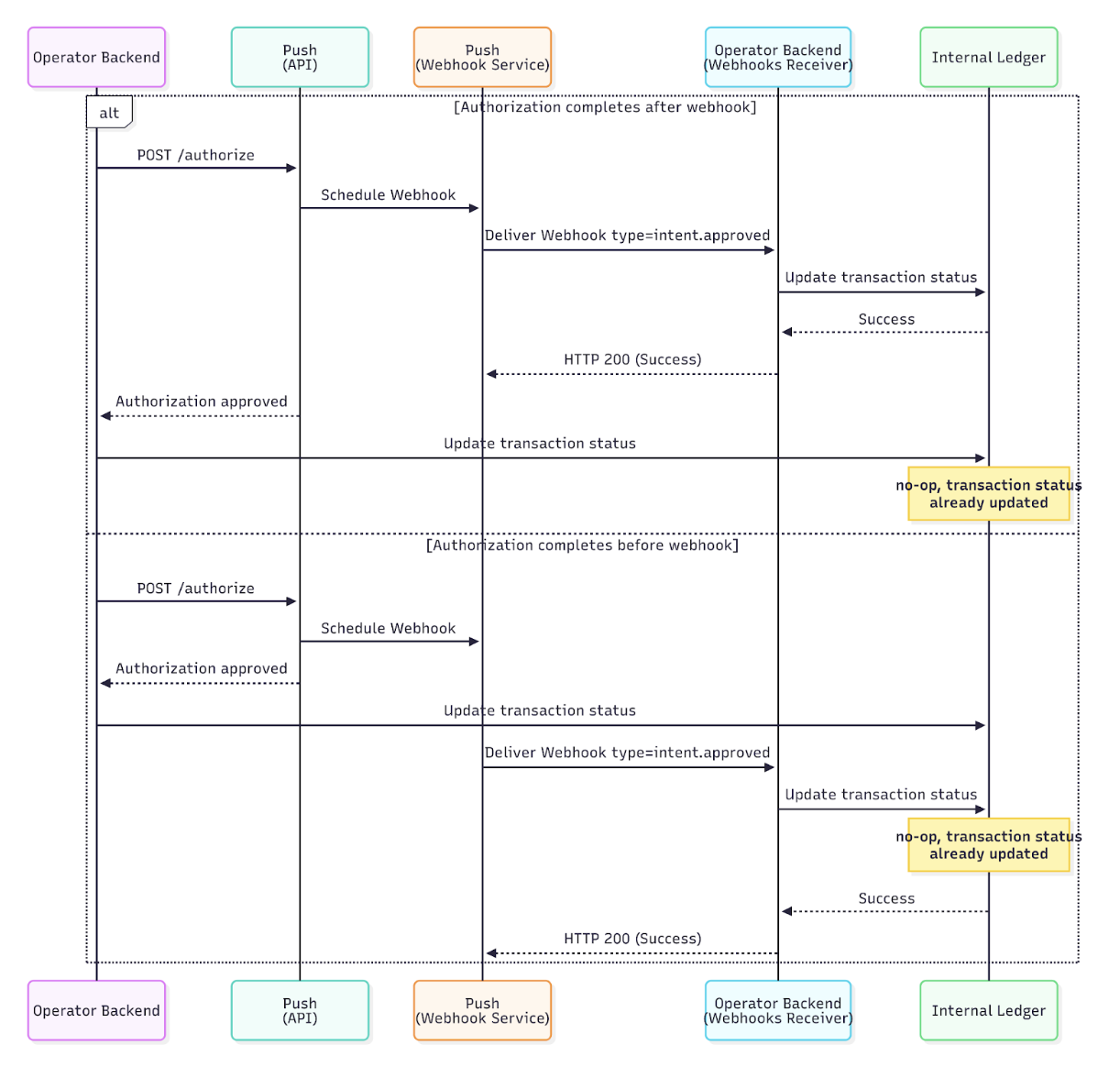
Idempotency
Push provides at-least-once delivery for webhooks. Your application must handle duplicate webhook deliveries gracefully using database transactions to ensure idempotency. In the case of a duplicated webhook delivery from Push either due to an error or timeout from your callback handler, you should discard the request and return a200 OK.
If Push does not receive a 200 OK response from your webhook endpoint, delivery will be retried with exponential backoff.
Security
Webhooks deliver data directly to an endpoint you control over the public internet. Because they are invoked automatically by Push, webhook endpoints must be explicitly secured to prevent unauthorized requests, data tampering, and replay attacks. Without proper verification, a malicious actor could spoof webhook requests and falsely mark payments as approved or declined in your system.If your cloud data environment restricts network access from external IPs via a firewall, you may need to allow inbound
traffic from Push IP addresses in order to receive webhook requests.
Push webhook source IP addresses
Push webhook source IP addresses
Production
44.238.180.175Sandbox 34.209.246.44Signature verification
Push signs a webhook request using an HMAC-SHA256 signature derived from the raw request payload and the signing secret for the registration that event arrived through — the secret from the originating authorize call, or the one from register-a-webhook. Use the event’stype to select which secret to verify against. This allows your application to verify that:
- The request was sent by Push
- The payload has not been modified in transit
- Extract the signature from the
X-Webhook-Signatureheader - Read the raw request body as bytes (before parsing JSON)
- Compute an HMAC-SHA256 signature using your signing secret and the raw body
- Compare the computed signature to the received signature using constant-time comparison
- Reject requests with invalid signatures (
401 Unauthorized)
Code examples for signature verification
Code examples for signature verification
Timestamp Verification
Thetimestamp field in the webhook payload indicates when the webhook was created. To prevent replay attacks, verify that the timestamp is recent (within 10 minutes).Verification Steps- Parse the
timestampfield from the payload (ISO 8601format) - Compare with current time
- Reject requests older than 10 minutes (return
401 Unauthorized)